EmergencyBuilt by drs_Dev

ers_integration

Connect ERS callouts to dispatch, duty tools, and server records.

Connects Emergency Response Simulator to QB-Core. ERS callouts can appear in PS Dispatch, and responders get duty, menu, tablet, and inventory tools. Qbox needs QB compatibility enabled.

QBCoreQbox bridgeAlso works with 5 other systems
Download latest code This is the latest code from GitHub, not a packaged release. Test it before using it on a live server.
Setup guide
Version
1.6
Updated
May 21, 2026
License
FiveM Script Non-Commercial License v1.0
Code access
Files available — check license
Status
Stable
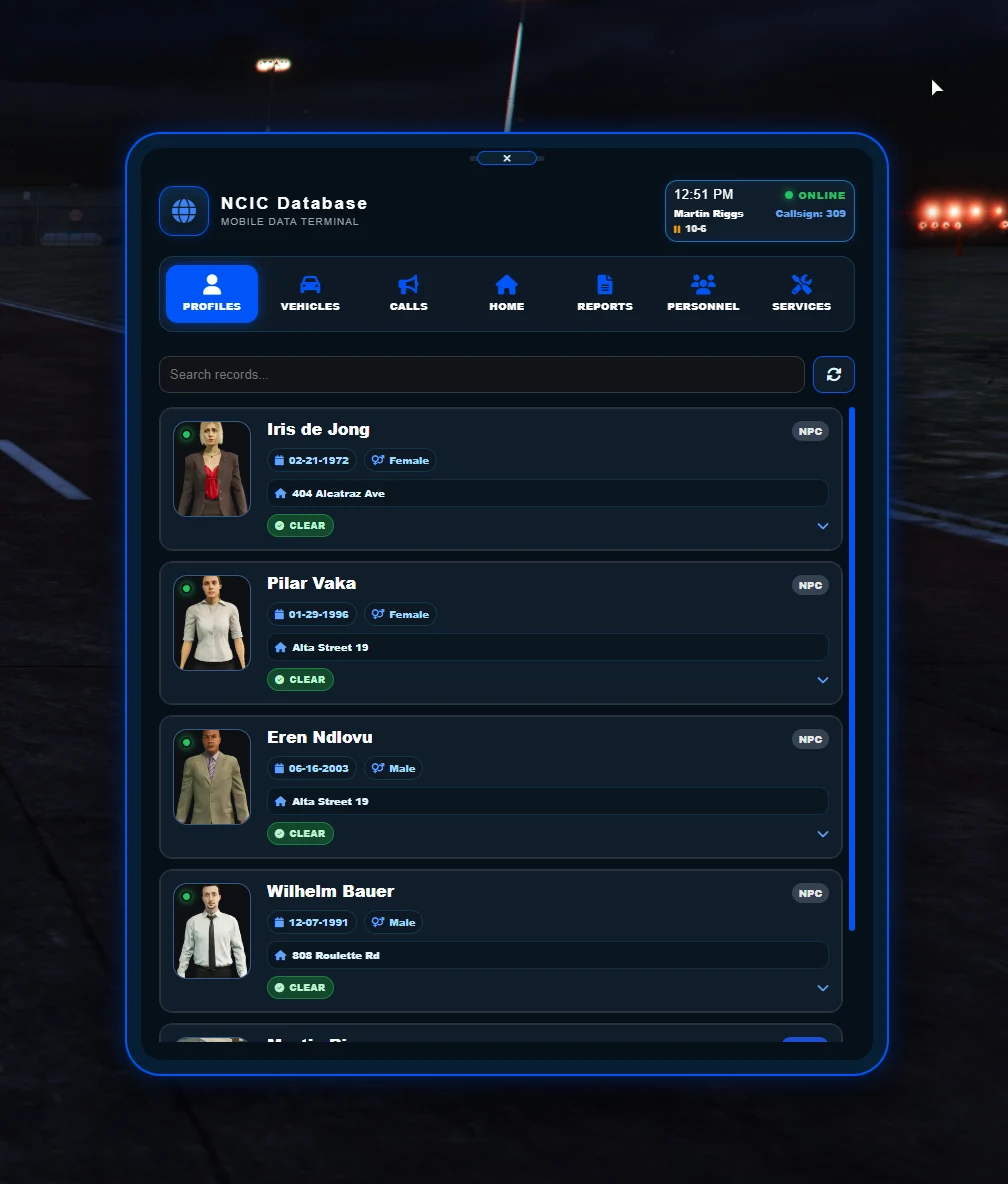
Resource previewERS tablet
1 of 3
screenshotERS tablet

Emergency services information and actions in the integration UI.

ERS tabletEmergency services information and actions in the integration UI.
01 / OVERVIEW

What it does

Type
Emergency Response Simulator add-on
Best for
QBCore-style servers using Emergency Response Simulator
Records
Mobile data terminal (MDT) database

ERS Integration connects the separate Emergency Response Simulator script to a QB-Core server. Simulator callouts, traffic stops, pursuits, duty locations, and service requests can feed into the server's dispatch and roleplay tools.

It also adds radial-menu and point-and-click actions, inventory tools, optional rewards, and a mobile data terminal (MDT) for calls, reports, people, vehicles, staff, dispatch, and service records. The code calls QB-Core directly, so Qbox requires QB compatibility.

02 / HOW IT WORKS

How an ERS call reaches the rest of the server

  1. 01

    ERS starts an incident

    night_ers creates a callout, traffic stop, pursuit, or service request for the add-on to handle.

  2. 02

    Other responders get an alert

    PS Dispatch can show the incident and its nearest postal code to other responders.

  3. 03

    Players use connected tools

    Duty points, menus, inventory items, and service actions connect the incident to QB-Core.

  4. 04

    The server keeps a record

    The MDT can save calls, reports, rewards, history, and service information for later roleplay or administration.

03 / CONNECTIONS

What it connects

Starts withEmergency Response Simulator (night_ers)
Connected byers_integration
PS Dispatch and nearest postal
MDT records
Target, radial, and inventory utilities
04 / FEATURES

Core features

01

QB-Core connection

Connect ERS duty roles, player details, jobs, and service actions to QB-Core. Qbox setups need QB compatibility.

02

Dispatch integration

Traffic stops, callouts, pursuits, service requests, and responder arrivals can create PS Dispatch alerts.

03

Mobile data terminal

A dedicated tablet keeps profiles, vehicles, calls, reports, personnel, service records, dispatch, and utility tools together.

04

Target and radial actions

Duty locations, service requests, database actions, and common ERS tools are available without memorizing commands.

More features6 more items
  • Duty-location interactions
  • Traffic-stop and pursuit dispatch paths
  • Service-request utilities
  • MDT records for people, vehicles, calls, reports, and personnel
  • Configurable arrival and traffic-stop rewards
  • Crosshair toggle command
05 / SETUP OPTIONS

What you can change

These are the main parts you can adjust for your server. The setup guide lists every option and example.

  • Tablet item and job restrictions
  • Responder locations and postal-code updates
  • Player and profile table names
  • Dispatch events, jobs, and timing
  • Service requests and arrival flow
  • Duty points and target entries
  • Rewards, amounts, and account
  • Notifications, chat, and animations
  • Radar, crosshair, and flashlight utilities
See every setup option
06 / REQUIREMENTS

What it works with

Server framework
QBCoreQbox bridge
Required
night_ers, PS Dispatch, ox_lib, oxmysql, nearest-postal
Menu
qb-radialmenu or qbx-radialmenu
Libraries
ox_lib, oxmysql, and a supported target
Also works with
OX Target
See all requirements and setup options
Technical details3 details
Runtime
FiveM Lua
Interface
Vanilla HTML, CSS, and JavaScript tablet NUI
Database
oxmysql
07 / LIMITATIONS

Known limitations

  • The server code requires qb-core. Qbox works only through compatibility that provides the expected qb-core name and API.
  • You must manually add the supplied entries to PS Dispatch and the radial menu during installation.
  • The current README notes an arrival message can still be announced after a denied service request.
  • Pursuit-backup functions are still marked work in progress. Review every reward setting before live use because the project warns that unsafe values may be exploitable.
More limitations1 more item
  • Emergency Response Simulator is a separate dependency, and the published demo is an older version of the integration.
08 / INSTALLATION
Ready to install?

Open the setup guide

The guide covers requirements, installation, server setup, connections to other resources, and troubleshooting.

Read the installation guide
09 / VERSION & SOURCE CODE

Version and source code

Latest version

v1.6Repository snapshot · May 2026
  • Documents QBCore workflows and a Qbox path that requires QB compatibility.
  • Includes the MDT database, callout history, personnel tools, rewards, and service integrations.
View change history

Credits and license

Project type
Built by drs_Dev
Maintainer
DrSnyder
License
FiveM Script Non-Commercial License v1.0
Code access
Files available — check license

Original integration by DrSnyder. Emergency Response Simulator is a separate required resource from Nights Software.

View source code on GitHub